DFW Airport Map – Dallas Fort Worth Airport Terminal Maps
Use the DFW Airport map to find Terminals A, B, C, D, and E, gates, baggage claim areas, parking, restaurants, shops, lounges, and transportation services at Dallas/Fort Worth International Airport (DFW). Our terminal maps make it easier to plan your arrival, departure, pickup, parking, or connection before you travel.
DFW Airport has five passenger terminals connected by the free Skylink train. Whether you need a DFW terminal map, gate map, parking map, or information about transferring between terminals, use the sections below to find the information you need.
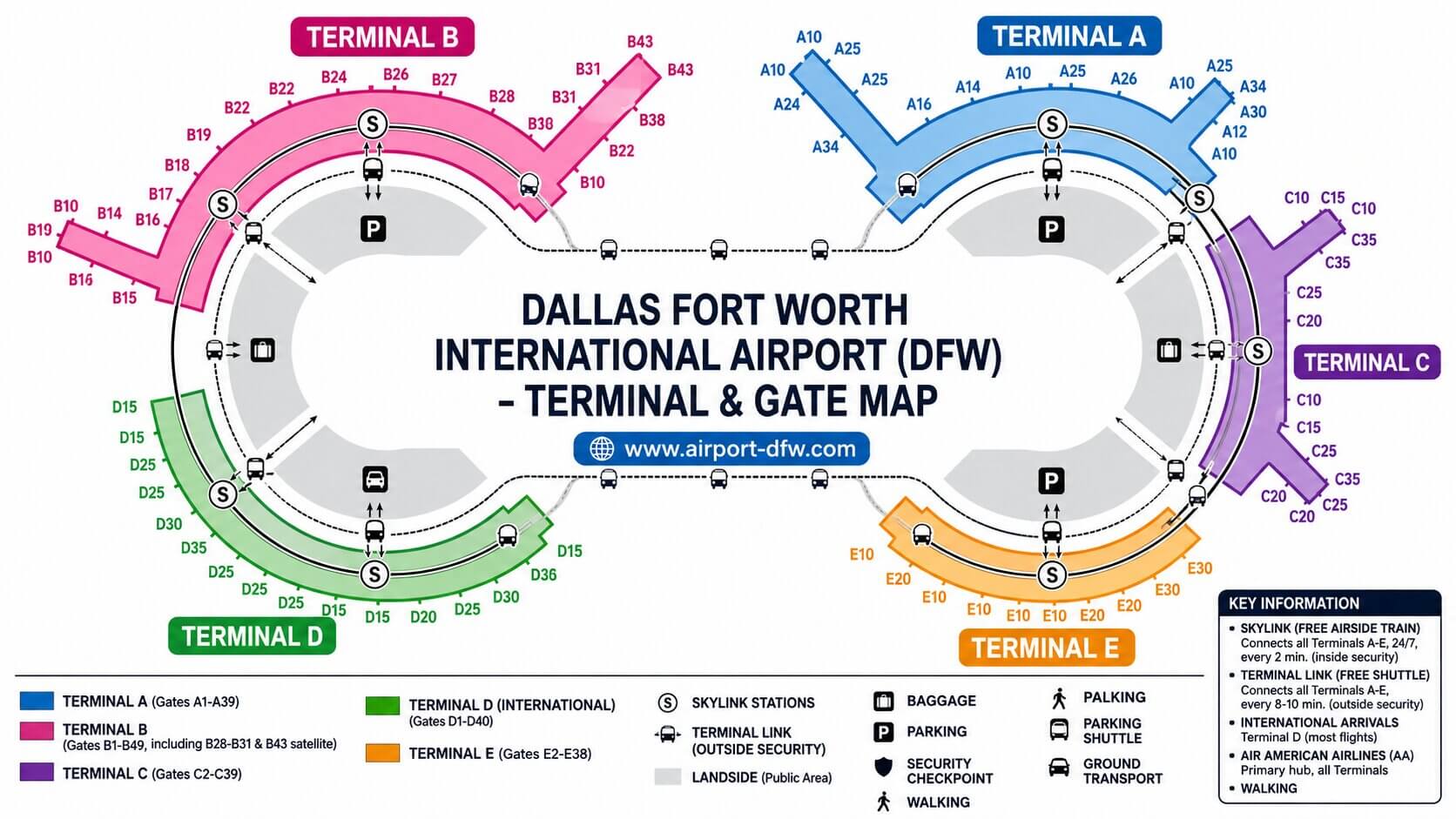
DFW Airport Map Quick Navigation
DFW Airport Map Overview
Dallas/Fort Worth International Airport is one of the largest airports in the United States. The airport has five passenger terminals: A, B, C, D, and E.
The DFW airport map shows the overall terminal arrangement and helps passengers understand where each terminal is located. Each terminal has its own gates, check-in areas, baggage facilities, restaurants, shops, and passenger services.
- Terminal A
- Terminal B
- Terminal C
- Terminal D
- Terminal E
- Skylink train stations
- Terminal and remote parking areas
- Passenger pickup and drop-off areas
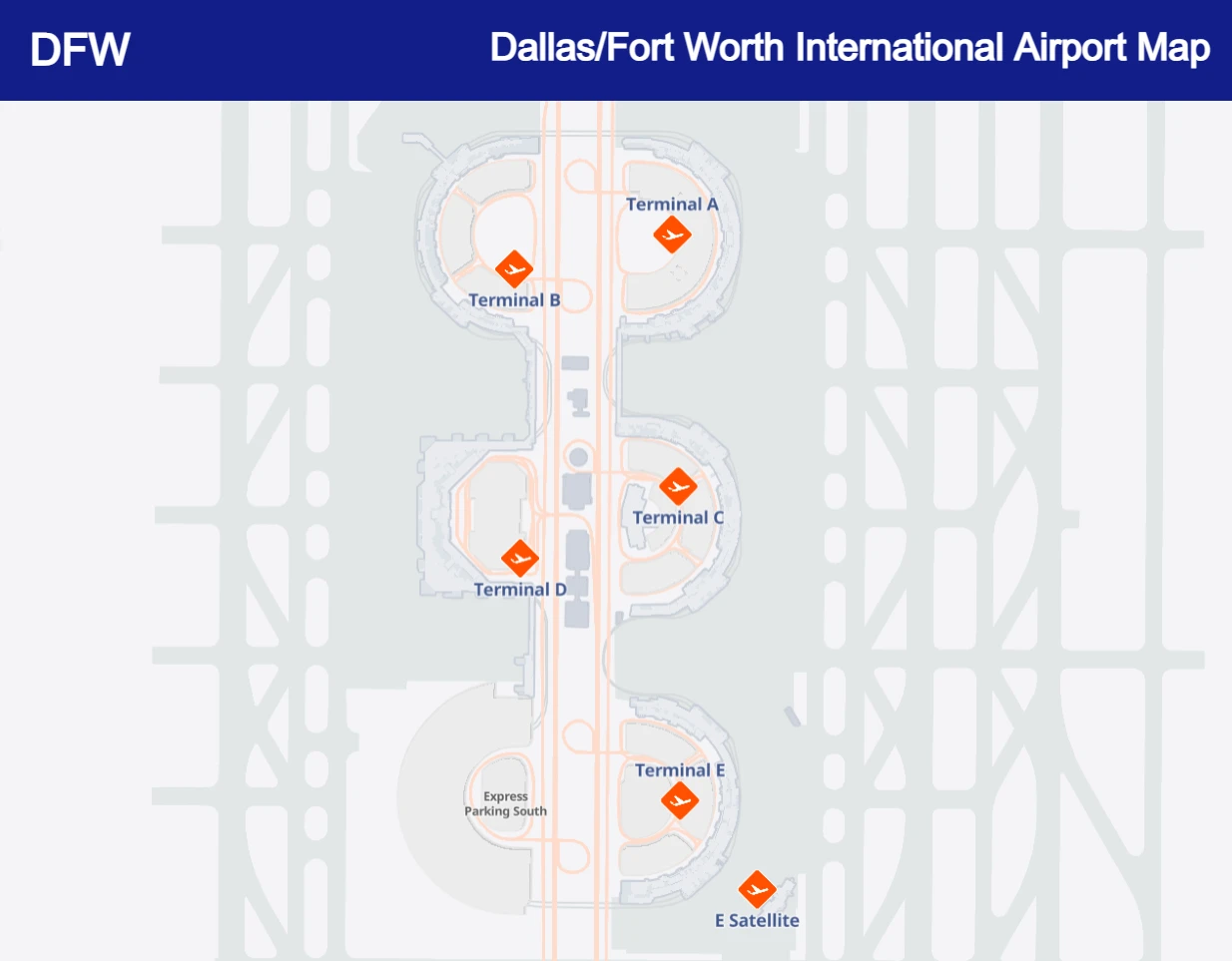
DFW Airport terminal layout and map
DFW Airport Layout and Terminal Diagram
The DFW airport layout is organized around five passenger terminals: A, B, C, D, and E. The terminals are connected by the airport's internal transportation system, including the free Skylink train.
Understanding the Dallas Fort Worth Airport layout can help you plan your journey before arriving. Your terminal determines where you should check in, where you should park, and which roadway or passenger pickup area you need to use.
A DFW airport diagram is particularly useful when you are connecting between flights, meeting an arriving passenger, or deciding where to park.
Five DFW Passenger Terminals
DFW operates passenger terminals A, B, C, D, and E. Check your airline and flight information before traveling because gates and terminal assignments can change.
Terminal Connections
Passengers can use the free Skylink train to travel between terminals after security. Roadways and airport transportation services also connect the terminals.
DFW Terminal Maps
Select a terminal below to view its map. The terminal maps can help you find gates, passenger facilities, restaurants, shops, lounges, and other services.
DFW Terminal A Map
Use the Terminal A map to locate gates, passenger facilities, dining, shopping, and other services.
DFW Terminal B Map
The Terminal B map helps passengers locate gates, services, dining, and transportation connections.
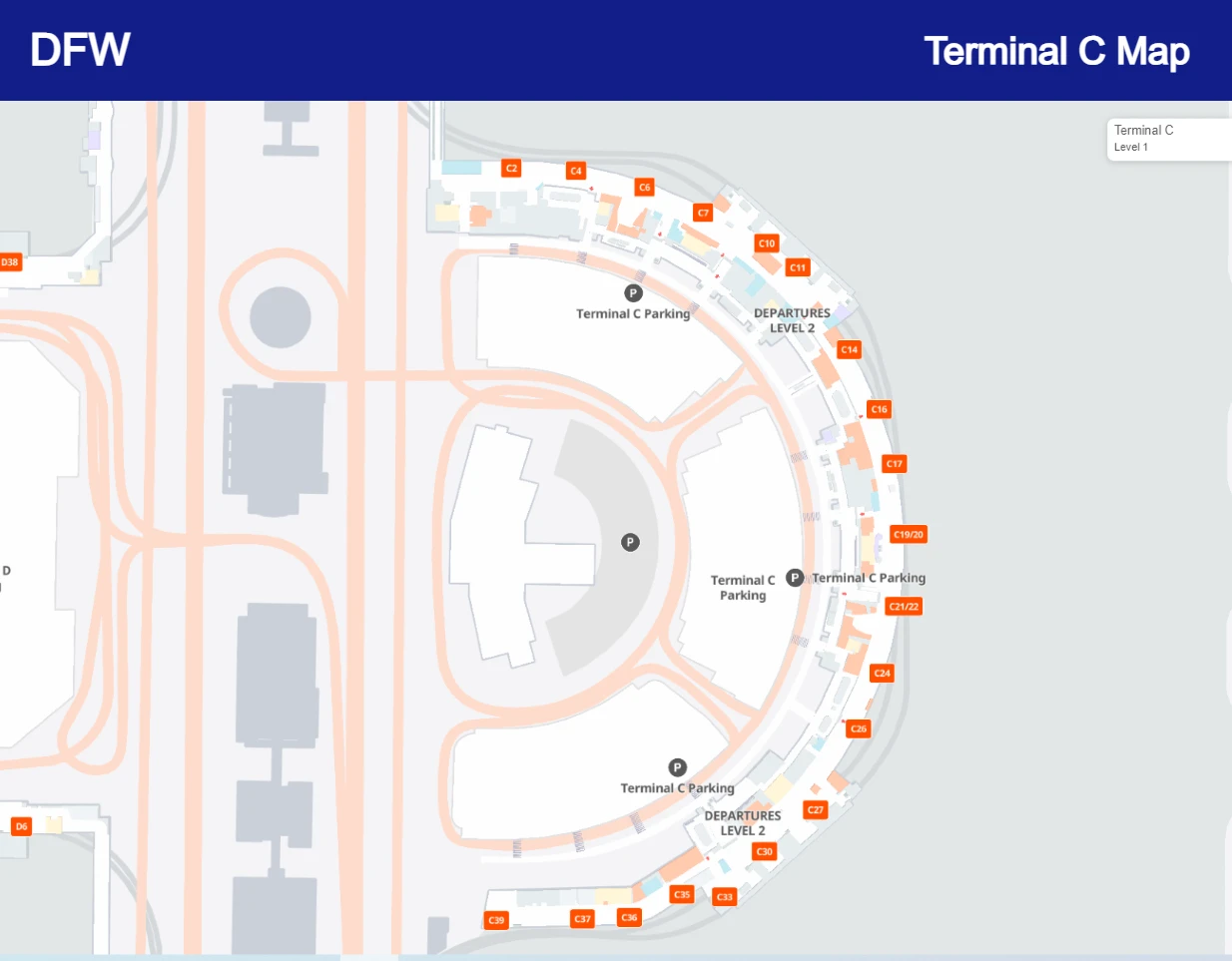
DFW Terminal C Map
Use the Terminal C map to find gates, restaurants, shops, passenger facilities, and connections.
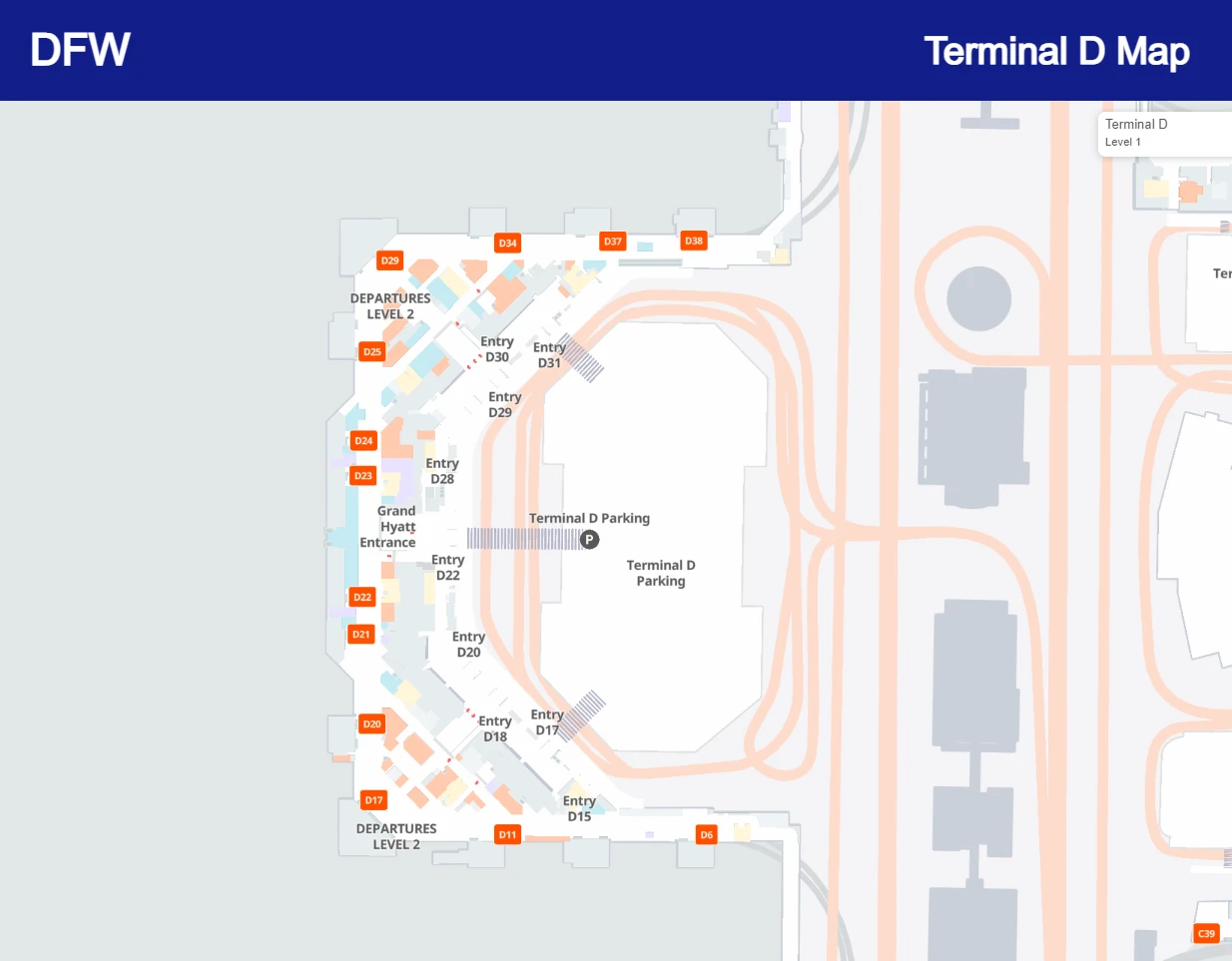
DFW Terminal D Map
The Terminal D map helps international and domestic passengers locate gates, lounges, dining, shopping, and other facilities.
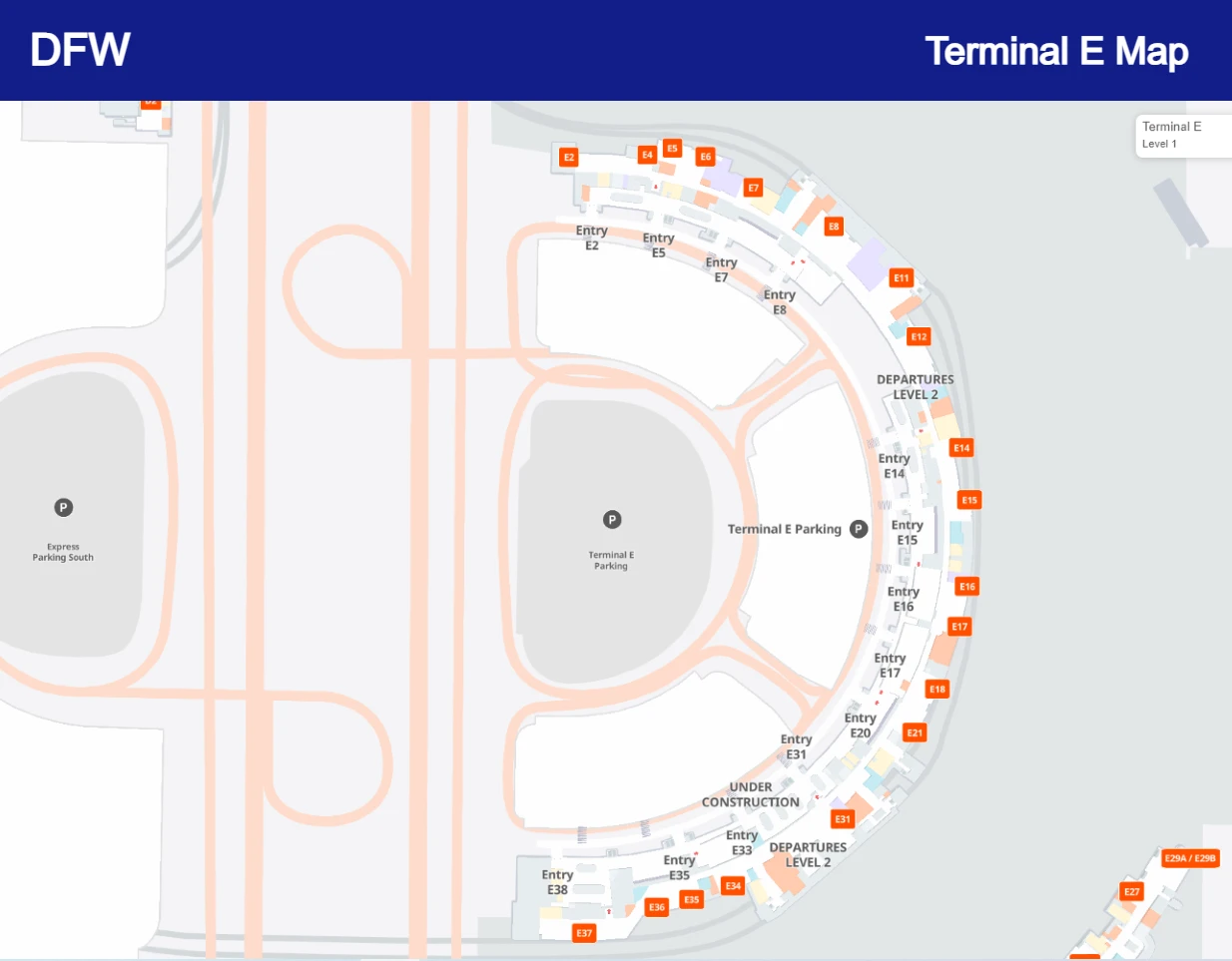
DFW Terminal E Map
Use the Terminal E map to locate gates, restaurants, shops, and passenger services.
Interactive DFW Airport Terminal Maps
Select a terminal to view its map.
DFW Terminal A Map
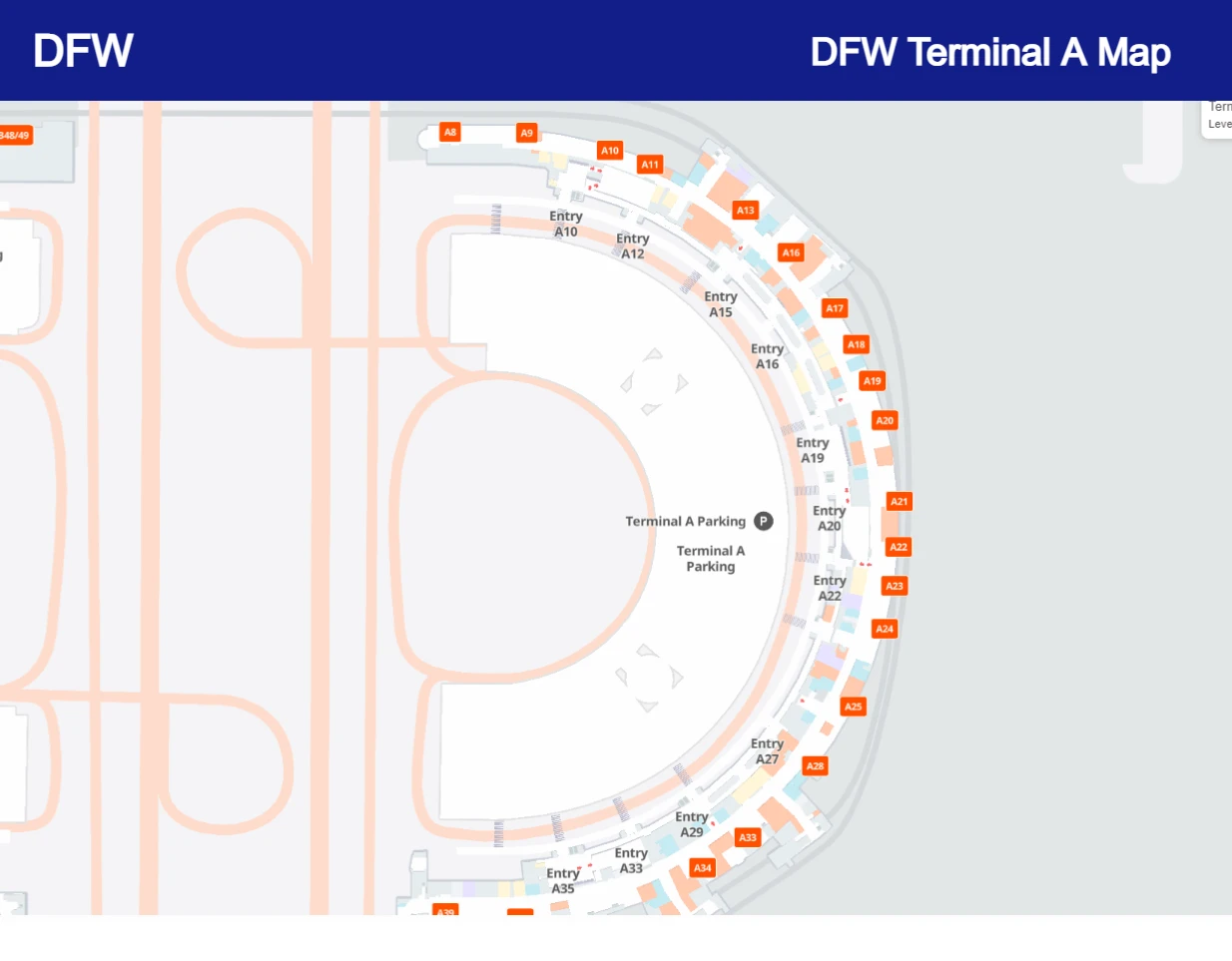
DFW Terminal B Map
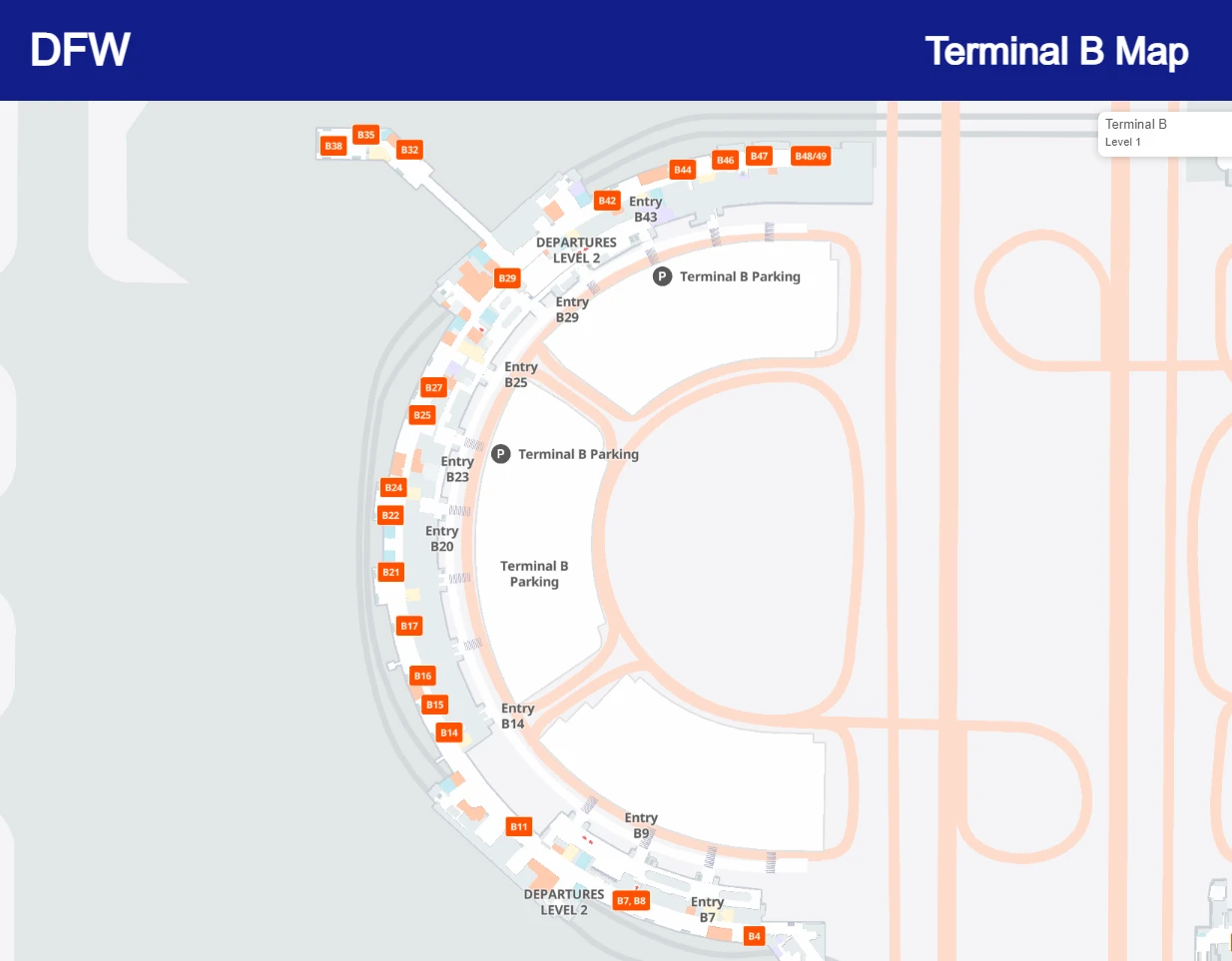
DFW Terminal C Map
DFW Terminal D Map
DFW Terminal E Map
DFW Airport Gate Map
The DFW gate map helps passengers understand the location of gates throughout Terminals A, B, C, D, and E. Your gate can determine which part of the terminal you need to reach after security.
Check your airline and flight information before traveling because gates can change. If you have a connecting flight, allow enough time to travel between terminals using Skylink.
- Terminal A Gates: Domestic passenger gates and services.
- Terminal B Gates: Passenger gates, dining, and airport services.
- Terminal C Gates: Passenger gates and connecting facilities.
- Terminal D Gates: International and domestic passenger facilities.
- Terminal E Gates: Multiple airline operations and passenger services.
DFW Skylink Train and Terminal Transfer Map
The DFW Skylink is a free automated train system connecting all five passenger terminals. It is particularly useful for passengers making connections between flights.
Use the DFW terminal transfer map to understand how to travel between Terminals A, B, C, D, and E. Skylink stations are located inside the secure area of the terminals.
If you are connecting between flights, check your departure terminal and gate before leaving your current terminal. The exact walking distance and transfer time can vary depending on the gates involved.
DFW Terminal Transfer Options
- Skylink: Free train service connecting the five terminals.
- Terminal roadways: Useful for passengers arriving by car.
- Walking: Some terminal areas can be reached on foot, although Skylink is generally more practical for longer terminal transfers.
DFW Airport Parking Map
The DFW Airport parking map helps travelers identify parking options near the five terminals. DFW offers several types of on-airport parking for short and long stays.
Terminal Parking
Located close to the passenger terminals and convenient for short stays, pickups, and drop-offs.
Express Parking
Covered and uncovered parking with shuttle transportation to the terminals.
Remote Parking
A more economical option for travelers leaving their vehicle at DFW for multiple days, with complimentary shuttle service.
Valet Parking
Convenient terminal valet service for travelers who prefer a premium parking experience.
See our DFW Airport Parking Guide for parking rates, prepaid parking, reservation information, and parking locations.
DFW Airport Pickup and Drop-Off Map
If you are picking up or dropping off a passenger at DFW Airport, confirm the passenger's terminal before entering the airport. The DFW airport pickup map can help you identify the correct terminal and plan your route.
For passenger pickup, confirm the arrival terminal and follow the airport's signs for the appropriate pickup area. Drivers should check current airport instructions before arriving because roadway arrangements and traffic conditions can change.
Before Picking Up a Passenger
- Confirm the airline and flight number.
- Check which DFW terminal the passenger is using.
- Confirm the arrival status before driving to the airport.
- Follow airport signs for passenger pickup.
- Use short-term parking if you need to leave your vehicle.
DFW Airport Directions and Location
Dallas/Fort Worth International Airport is located between the cities of Dallas and Fort Worth in North Texas. The airport is identified by the IATA airport code DFW.
Before driving to DFW, check your flight information and identify your departure or arrival terminal. Using the DFW airport directions together with the terminal map can help you choose the correct airport entrance, parking area, and terminal roadway.
- Airport: Dallas/Fort Worth International Airport
- IATA Code: DFW
- Terminals: A, B, C, D, and E
- Region: North Texas
DFW Airport Arrivals and Departures Map
The DFW terminal maps can help arriving and departing passengers understand where check-in, security, gates, baggage claim, and ground transportation areas are located.
DFW Departure Map
Departing passengers should confirm their airline and terminal before arriving. Once inside the correct terminal, use the terminal map to locate check-in counters, security checkpoints, gates, restaurants, and other services.
DFW Arrival Map
Arriving passengers can use the terminal map to find baggage claim, ground transportation, passenger pickup areas, and connections to other terminals.
DFW Airport Baggage Claim Map
Baggage claim facilities are located within the passenger terminals. If you are meeting an arriving passenger, confirm the terminal and flight information before traveling to DFW.
Once inside the appropriate terminal, follow airport signs for baggage claim and ground transportation. Your terminal map can help you understand the location of baggage facilities relative to other passenger services.
DFW Airport Restaurants, Shops and Lounges Map
DFW Airport has restaurants, cafes, retail stores, lounges, and other passenger amenities throughout its terminals. Use the DFW terminal maps to locate services near your gate or along your route through the airport.
DFW Airport Dining Map
Travelers can use terminal maps to locate restaurants, cafes, bars, and other food options. Dining choices vary by terminal and gate area.
DFW Airport Shopping Map
Retail stores are located throughout the airport. Terminal maps can help passengers find shops near their departure gate.
DFW Airport Duty-Free Shops Map
Duty-free shopping is available in selected international passenger areas. Travelers should check the terminal and current store information before their trip.
DFW Airport Lounges
Airport lounges are located in various terminal and gate areas. Use the appropriate terminal map to understand the location of lounges relative to your departure gate.
DFW Airport Rental Car Center Map
Travelers renting a vehicle at Dallas/Fort Worth International Airport should check the current airport transportation information before traveling to the rental car facilities.
The DFW rental car center map can be useful when planning your journey after arriving at the airport. Check your rental company's instructions for the correct pickup location, transportation method, and return procedure.
Printable DFW Airport Map
If you need a map for offline reference, you can save or print the terminal maps shown on this page before traveling. A printable DFW airport map can be useful when you want quick access to terminal, gate, parking, and transfer information without repeatedly searching online.
For the most accurate information, check the latest airport information before your journey because gates, services, and roadway arrangements may change.
DFW Airport Smoking Areas Map
Smoking areas at DFW Airport are located in designated areas outside the terminal buildings. Passengers should follow airport signs and current airport rules when looking for a smoking area.
If you leave a secure terminal area, allow enough time to return through security before your flight.
DFW Terminal Map Comparison
| Terminal | Map | Useful For |
|---|---|---|
| Terminal A | Terminal A Map | Gates, dining, shopping and passenger services |
| Terminal B | Terminal B Map | Gates, dining, shopping and connections |
| Terminal C | Terminal C Map | Gates, restaurants and passenger services |
| Terminal D | Terminal D Map | International and domestic passenger facilities |
| Terminal E | Terminal E Map | Gates, dining, shopping and passenger services |
Tips for Using the DFW Airport Map
- Check your terminal first: Confirm your airline and flight information before traveling.
- Check your gate: Gates can change, so verify your latest flight information.
- Plan terminal transfers: Use Skylink when transferring between terminals after security.
- Choose parking in advance: Check the DFW parking options before driving to the airport.
- Allow extra time: Give yourself enough time for parking, security, walking, and terminal transfers.
- Save the map: Save or print the terminal map if you need offline access.
Frequently Asked Questions About the DFW Airport Map
How many terminals does DFW Airport have?
Dallas/Fort Worth International Airport has five passenger terminals: A, B, C, D, and E.
Where can I find the DFW Terminal A map?
The Terminal A map is available in the interactive terminal map section above. You can also use it to locate gates and passenger facilities.
Is there a DFW Airport map with gates?
Yes. The terminal maps above show the terminal layout and can help passengers locate their gate area and nearby facilities.
How do I get from one DFW terminal to another?
Passengers can use the free Skylink train to travel between DFW's five terminals. Check the terminal map and your flight information before transferring.
Where can I find the DFW Airport parking map?
The parking section on this page provides an overview of Terminal, Express, Remote, and Valet Parking. See our DFW Airport Parking Guide for detailed parking information.
Does DFW Airport have a printable map?
You can save or print the terminal maps displayed on this page for offline reference. Always check current airport information before traveling because facilities and passenger routes can change.
Where can I find the DFW Airport pickup map?
Use the pickup and drop-off section above to plan your journey to the appropriate terminal. Confirm the arriving passenger's terminal and flight information before driving to the airport.
Plan Your Trip Through DFW Airport
Use the DFW Airport map to plan your terminal, gate, parking, dining, and terminal transfer before your trip. Knowing where you need to go in advance can make your airport experience easier and less stressful.
View DFW Airport Parking